Looking for today's Dice Dreams free rolls? They're released daily by the developer, and the section just below points you to the official source where you can claim them safely.
The rest of this guide covers how to redeem them, every way to earn more for free, and how EarnStar turns the time you already spend gaming into real money.
Where to get today's Dice Dreams free rolls links
The quickest and safest way to get free rolls is straight from the developer. SuperPlay posts fresh reward links every day on its official Facebook page:
Get today's free roll links on the official Dice Dreams Facebook page →
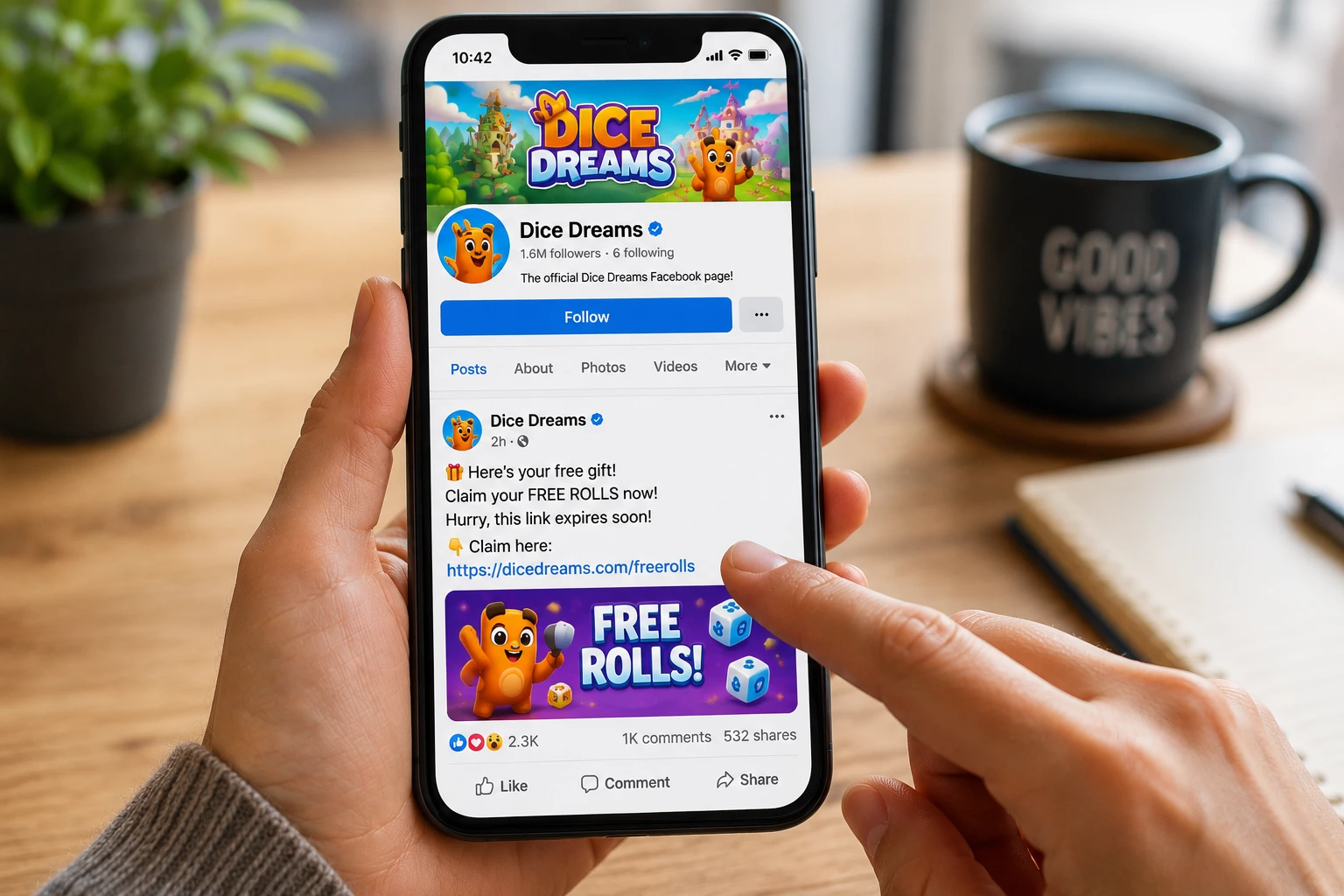
Follow the page and turn on notifications so new links reach you the moment they drop. SuperPlay also shares links on the game's Instagram and through the in-game inbox and event notifications, but Facebook is where they appear first and most often.
This matters because links expire within a day or two, and the gap they leave gets filled by fake "free rolls" pages built to waste your time or harvest your login details. The official page is the one place you can be sure a link is genuine and still live.
The safety rule that matters: only claim from official or clearly verified sources. A real reward link never asks for your password, a survey, or a payment. You tap it, the game opens, and the rolls land. Anything else, close it.
How to redeem Dice Dreams free roll links (iPhone and Android)
Redeeming is quick, but one detail trips people up: free roll links are deep links, so you have to open them on the same device where Dice Dreams is installed. Otherwise, the link can't route into the app.
Rewards land in-game, usually instantly, as long as the app is installed and updated first. The steps differ slightly between iPhone and Android.
Redeem on iPhone (iOS)
- Install or update Dice Dreams from the App Store so you're on the latest version.
- Tap today's link on the same iPhone that has the game installed.
- Allow the link to open in the Dice Dreams app when prompted.
- Confirm the rolls have been added to your in-game balance.
Redeem on Android
- Install or update Dice Dreams from the Google Play Store.
- Tap the link on the same Android device where the game lives.
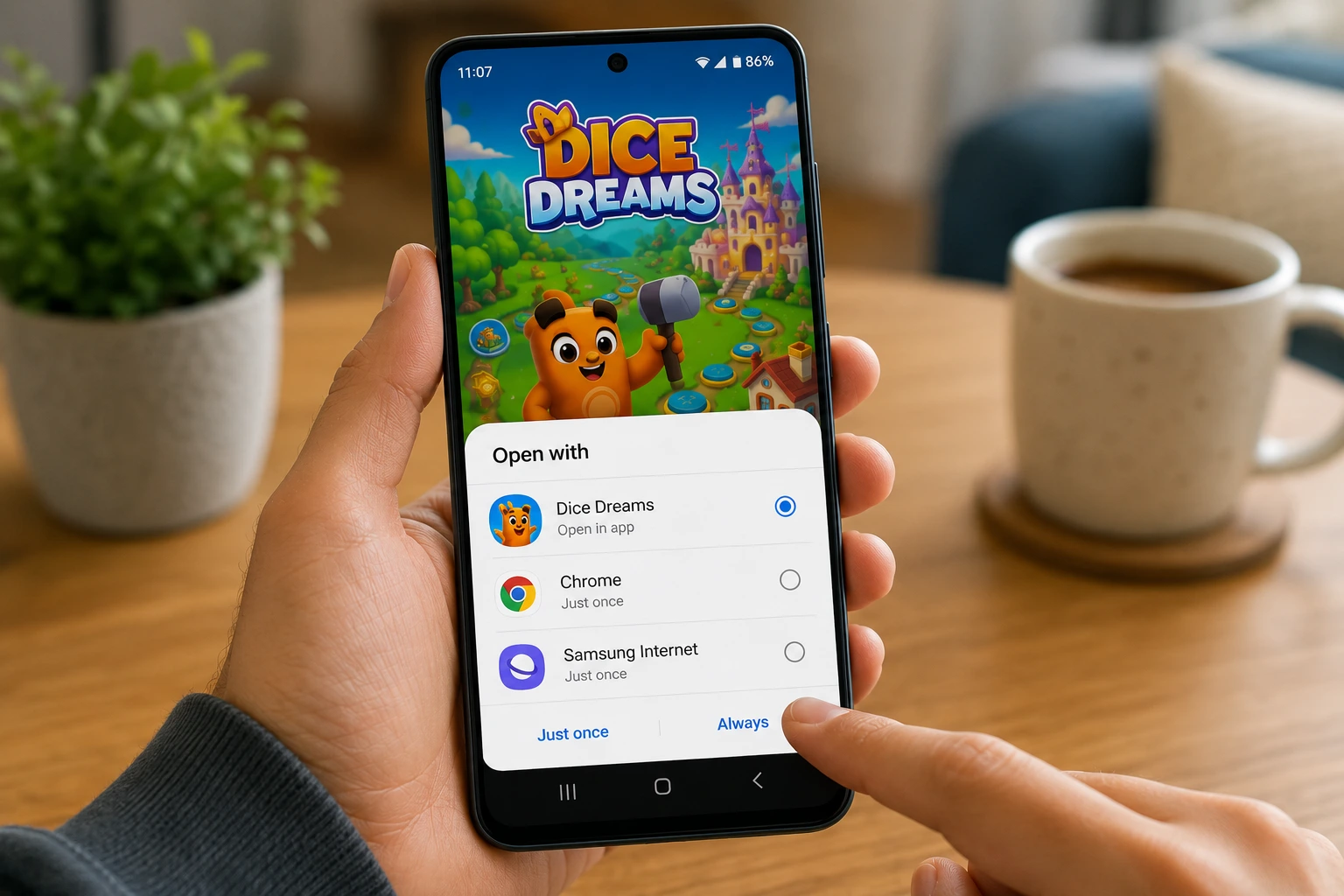
- Let the link open via the deep link. Android may ask which app to use, so choose to open it with Dice Dreams.
- Confirm the rolls credited to your balance.
When a link won't work
If a link does nothing, it's usually one of three things:
- Expired: the link is past its claim window. Grab a newer one from an official source.
- Already claimed: you've redeemed it before. Each link works once per account.
- App not installed or synced: install or update Dice Dreams on that device, then reopen the link.
There's more troubleshooting in the FAQ near the end of this page.
How many free rolls you can get and how long links last
You can stack a lot of rolls in a day. Each daily link grants up to 50 rolls, and several post daily, so totals can climb into the hundreds if you claim them all. On a good day, that can mean 200 or more rolls, though treat that as a rough ceiling rather than a guarantee.
The catch is timing. Links usually expire within a day or two of release, which is exactly why claiming the same day matters.
Key numbers
- Up to 50 rolls per free link
- Links usually expire within a day or two
The in-game roll cap and regeneration
Rolls regenerate on their own. The game hands you 5 free rolls every hour, up to a stored cap of around 50, so they don't pile up indefinitely.
There's also a low-balance nudge: when you drop below 10 rolls, the game offers a small top-up.
Spend your rolls down before claiming a big batch of links. That way you won't hit the cap and waste rolls you could have used.
How to earn more Dice Dreams free rolls in-game
When the daily links expire, the game itself keeps handing out rolls. Dice Dreams is a casual mobile board game, and several built-in features give you free rolls without any external link. Events are the main driver, so that's the place to start.

Play the in-game events
Events rotate seasonally and pay out more rolls than any other in-game method. Common ones include:
- Building Blitz: rewards rolls for fast building progress.
- Frank's Kitchen: a cooking-themed event with roll payouts.
- Tile Twister: a tile-matching challenge.
- Aztec Fortune: a themed roll-earning event.
- Trails: a progression event with milestone rewards.
- Treasure Hunts: seasonal hunts that pay out in rolls.
Time your roll spending to whichever event is currently active, since events often boost payouts during their window.
Link your Facebook account
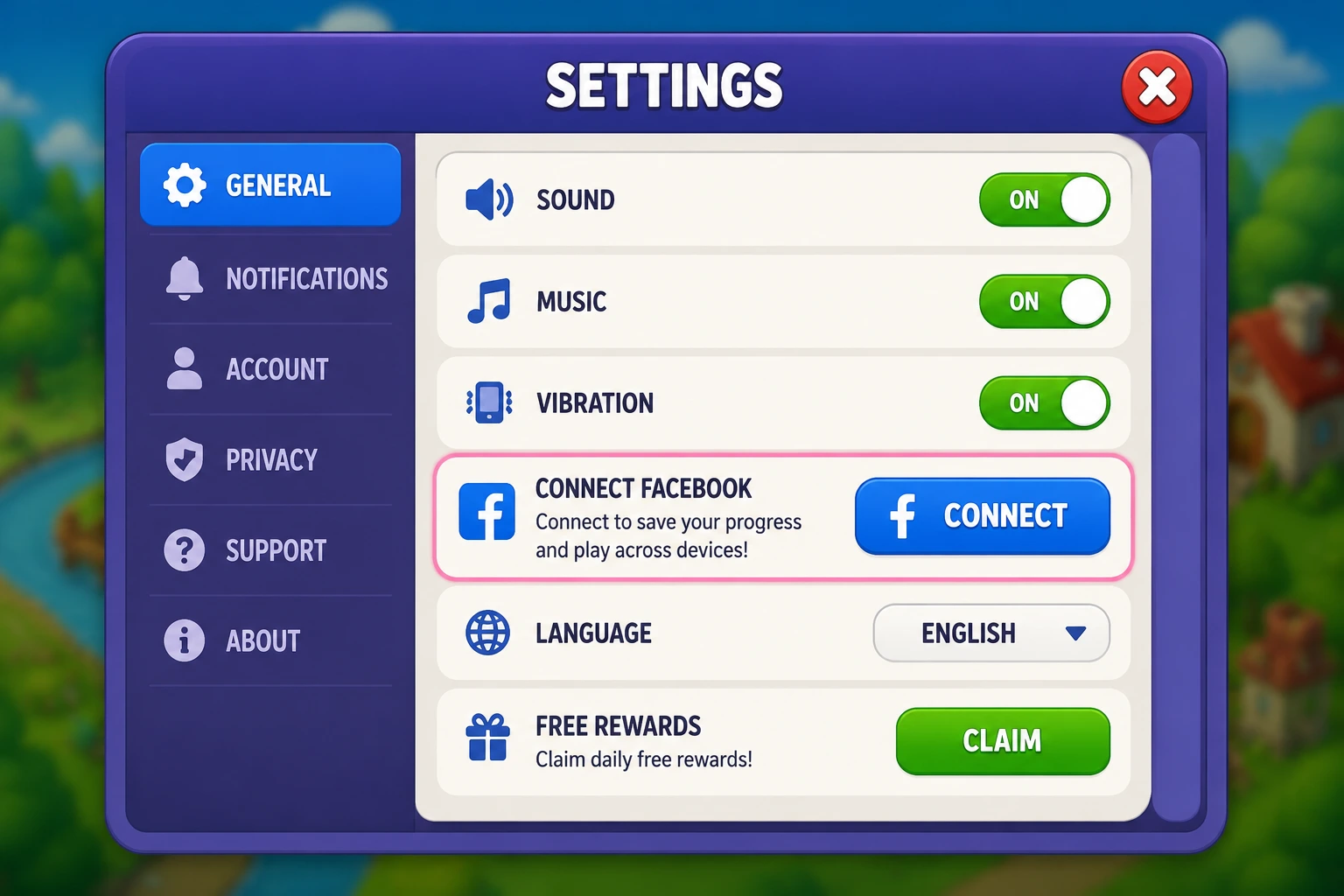
Connecting a Facebook account unlocks free rolls and saves your progress across devices. It's a one-time win that's worth doing early.
- Open the in-game settings menu.
- Find the Facebook connect option.
- Sign in and authorize the link.
- Collect your bonus rolls once the account connects.
Invite friends
Inviting friends who join the game grants a roll bonus per successful invite. There are caps on how many invites pay out, so treat it as a useful boost rather than an endless source of rolls.
Daily logins and low-roll prompts
Logging in regularly earns daily login rewards, no link needed. The low-balance prompt covered earlier also chips in a few extra rolls when you drop below 10.
Treat both as small nudges rather than a steady source. They're handy, and neither needs a link.
Every way to get Dice Dreams rolls, compared
Here's how the methods stack up on effort versus reward, so you can see which are worth your time.
| Method | Typical rolls | Effort | Frequency | Expiry |
|---|---|---|---|---|
| Daily free links | Up to 50 each | Low | Several daily | A day or two |
| In-game events | Varies | Medium | Rotating | Event window |
| Facebook link bonus | One-time | Low | Once | None |
| Friend invites | Per invite | Medium | Capped | None |
| Hourly refill | 5 per hour | Passive | Hourly | None |
| Daily login | A few | Low | Daily | None |
| Buying rolls | Varies (paid) | Costs money | Anytime | None |
Free methods cover casual play comfortably, so most players never need to spend. Buying rolls only makes sense if you're chasing leaderboard placements.
Are Dice Dreams free rolls safe and legit?
Yes. Dice Dreams is a legitimate free-to-play casual board game, and its official reward links are safe to claim. The only real risk comes from fake third-party links pretending to be official.
The game has serious backing. It's developed by SuperPlay, and in November 2024 Playtika acquired the studio in a deal worth up to $1.95 billion, with $700 million paid upfront. Dice Dreams itself has passed 170 million downloads. That's not a fly-by-night operation.
To stay safe, keep this short checklist in mind:
- Claim only from official or verified sources.
- Never enter your login credentials on a link page.
- Ignore any "free rolls" site that asks for payment or personal info.
And to be clear, Dice Dreams uses dice-roll mechanics, but it's a casual board game, not gambling. There's nothing to wager and nothing to lose.
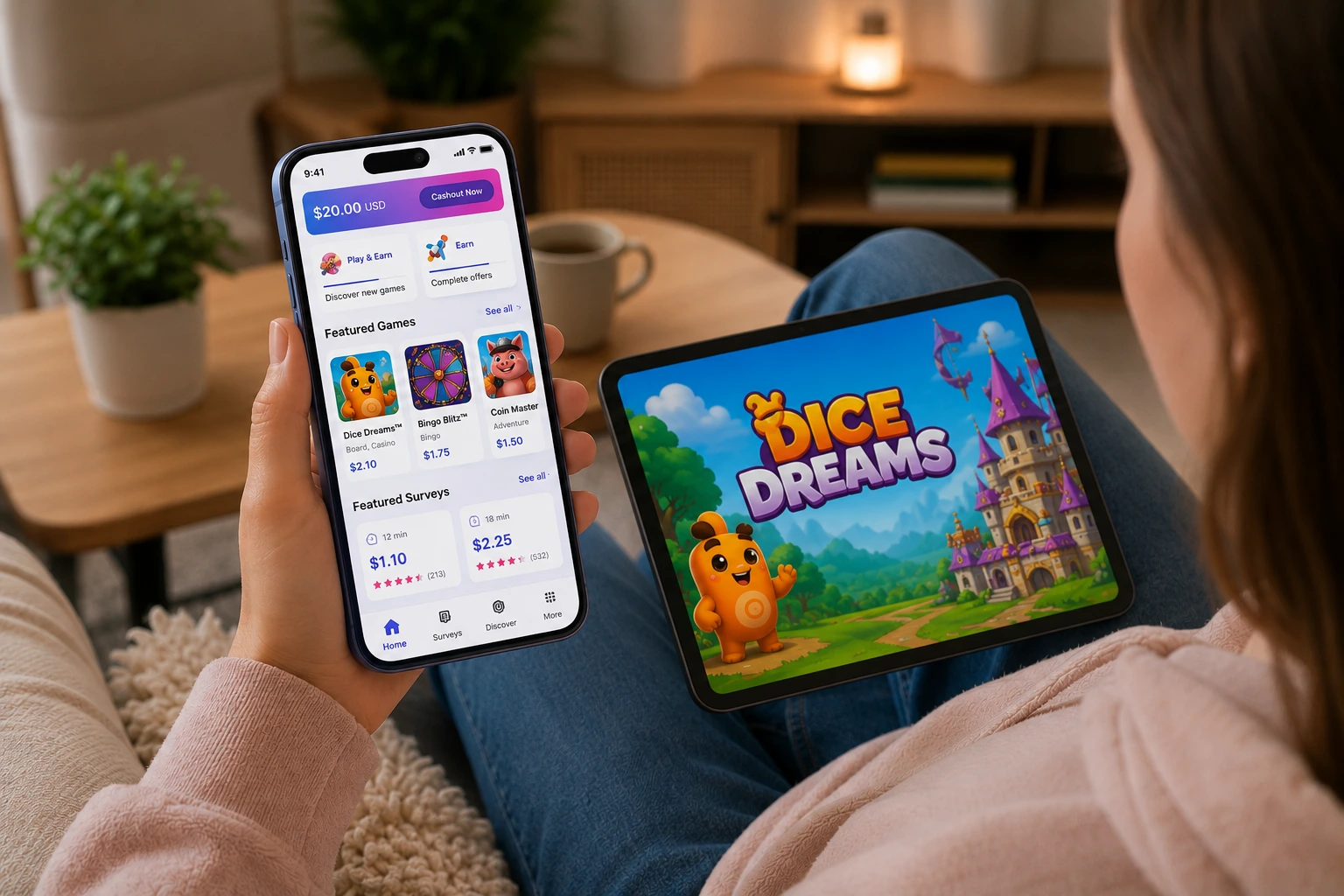
Can you earn real money playing Dice Dreams?
Dice Dreams pays you in rolls and in-game prizes, not cash. The rewards stay inside the game.
The time you already spend on casual mobile games, though, can pay back in real money through a rewards app like EarnStar, which pays you to play games, complete surveys, and finish simple tasks. The tagline puts it plainly: earn your side income from playing your favorite games.
EarnStar's appeal is how easy it is to use and withdraw. It works across iOS, Android, and web, has a wide game selection, pays out fast, and lets you cash out at just $1, so you're not waiting weeks to see your first payout.
Earnings vary with the time you put in, and this is side income rather than a salary, so set expectations accordingly.
How earning real money from games works
Rewards apps pay you to discover and play games or complete offers. As you play, you build up points or coins, then cash out to PayPal, gift cards, and similar options.
How much you earn depends on the time you invest, but it turns hours you'd spend gaming anyway into real money back in your pocket.
Make your Dice Dreams rolls go further
Follow the official Dice Dreams Facebook page for the daily links, and fall back on the in-game methods, events, account linking, invites, and hourly refills, whenever a link expires. Between the two, you'll rarely run short on rolls.
Commons questions about Dice Dreams

Get paid to play games
EarnStar lets you earn real money while having fun. Download EarnStar free on iOS App Store and Google Play to start turning your game hours into payouts.